STM32 (No IDE)
Open STM32 Nucleo (No IDE) through LabsLand.
LabsLand ARM Community
Program a real ARM microcontroller with peripherals and low-power modes. Upload binary file.
Laboratory information
The STM32 lab allows users to program and control an ST WB55RG Nucleo board remotely. In this version of the laboratory, users can upload a compiled binary file to be programmed into the board, so they can use any kind of toolchain, including industry standard offline tools. The lab includes various input and output peripherals, such as switches, buttons, potentiometers, and sensors, as well as an LCD screen and a servo motor. It can be used to study low-energy consumption modes. It is suitable for use in courses on embedded systems, microcontroller programming, the Internet of Things (IoT), etc.
The STM32 remote laboratory by LabsLand allows users to program and control an ST Nucleo WB55RG board and various input and output peripherals, such as LEDs, an RGB LED, switches, an OLED display, and a servo motor. The laboratory also supports a range of low-power modes, including Sleep, Low-power run, Low-power sleep, Stop 0, Stop 1, Stop 2, Standby, and Shutdown. These modes can be used to study the impact of energy consumption on the performance and functionality of the STM32 board.
This version of the STM32 laboratory allows users to upload compiled binary files to be programmed into the board. Various specific formats are supported, including .bin, .axf, .hex or .elf. All STM32 toolchains and IDEs will generate one of these formats, so the laboratory is compatible with any kind of workflow.
Students can leverage any of the traditional tools (e.g. STM32CubeMX) or desktop-based IDEs and toolchains (Keil, STM32CubeIDE, Eclipse with a GCC-ARM toolchain, etc).
Students can freely use STM32CubeMXProgrammer. To facilitate this process, LabsLand has pre-generated such a project and made it available to users as a starting point. This project is designed to be directly compatible with the hardware and serves as a good general starting point. It can be modified freely.
There are also multiple guides and specifications describing how the remote hardware is connected, so students can alternatively use that information to build their own STM32CubeMX configuration from scratch.
The STM32 remote laboratory by LabsLand is a versatile platform that can be applied to a wide range of courses, including:
These courses may involve programming the STM32 board, interfacing with various sensors and peripherals, and studying the principles of microcontroller-based systems and IoT. The STM32 remote lab provides the necessary hardware and software tools for hands-on learning and experimentation in these areas.
In this version of the laboratory ("STM32 Nucleo - No IDE") students upload a compiled binary file, so it is designed to be used with any toolchain, including industry-standard toolchains, offline IDEs or fully-fledged online IDEs such as Mbed's.
An alternative version of the laboratory exists in which users program the boards using LabsLand's online C/C++ IDE, an easy-to-use IDE with a shallow learning cuve designed for educational use. Though less powerful than this version, the online IDE allows students to get started in seconds and without needing to install any software on their devices. It is therefore suitable for introductory activities.
The development of this laboratory is conducted as part of the REMOCLEC project. The REMOCLEC consortium, led by LabsLand, is also formed by the University of Deusto and Plegma Labs. REMOCLEC is funded by the Smart4All European project, which is funded by the European Union’s Horizon 2020 research and innovation programme.
What students do
Available experiments
Open STM32 Nucleo (No IDE) through LabsLand.
Upload a binary to a STM32 board, selecting user a interface
Teaching resources
Default generated project (template), configured to support the hardware.
This compressed file contains a project generated with STM32CubeMX (a template) that is configured to be compatible with the laboratory hardware and can be used as a starting point.
The archive also contains an IOC file that can be opened with STM32CubeMX itself, so that the user can, if desired, further modify this template; and generate a different starting project.
The user must of course bear in mind that much of the laboratory hardware is fixed. Some of the configuration parameters present in the template, therefore, may not need to be modified.
It should be noted that this same template is used by default in the online IDE version of the lab.
This general guide explains how to use the STM32 Nucleo lab in this version (without online IDE).
This version of the STM32 remote lab without online IDE allows students to create their programs using any standard toolchain. The lab accepts as input various types of compiled programs (binary files). Among them, it accepts files ending in .HEX, .BIN, .ELF or .AXF. Once the binary is provided, the lab programs it on a board assigned to the user, and allows the user to interact with it. With this approach the lab is particularly flexible.
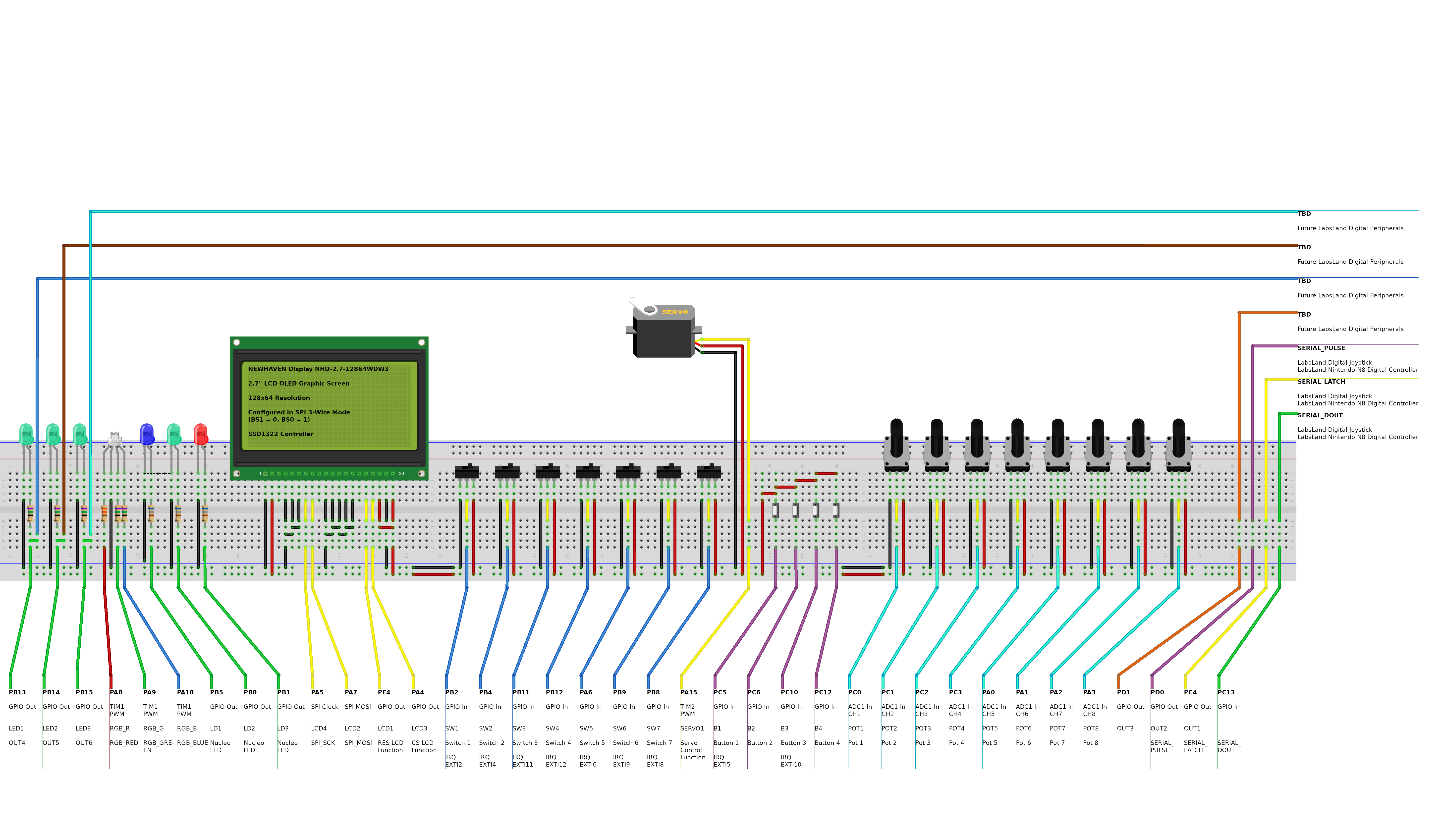
This guide also explains how the lab is physically configured in different aspects, and provides various data that is necessary or useful to use it; such as pin or hardware configurations.
The specific sections of the guide are as follows:
Fritzing Diagram for the STM32 lab
Open resourceActivity to conduct on the 3D smart parking model controlled with the real STM32 device and using Keil Studio Cloud
Design and implement a smart parking system logic using the STM Nucleo-WB55RG board in a remote lab setting. This interactive activity, hosted on LabsLand’s STM Nucleo-WB55RG remote laboratory, provides an immersive experience through a 3D virtual model of a parking system, which is controlled and interacts bidirectionally with the real STM device. You will develop your logic using C++programming and the powerful yet easy-to-use Mbed OS 6 API,in the Keil Studio Cloud online IDE, without the need for physical hardware.
Solution for the Smart Parking design activity for STM32 and Keil Studio Cloud
This is only the solution, available for instructors. You may download the activity itself in the non-solution link. This solution is a compressed file containing a project downloaded from Keil Studio Cloud. It has been created in C++ and uses the Mbed OS 6 API. You may upload it into Keil Studio Cloud to compile it (or to build it offline through other tools).