STM32 IDE (C/C++)
Program a STM32 Nucleo board with C or C++

LabsLand ARM Community
Program a real ARM microcontroller with peripherals and low-power modes. Use an online IDE.
Laboratory information
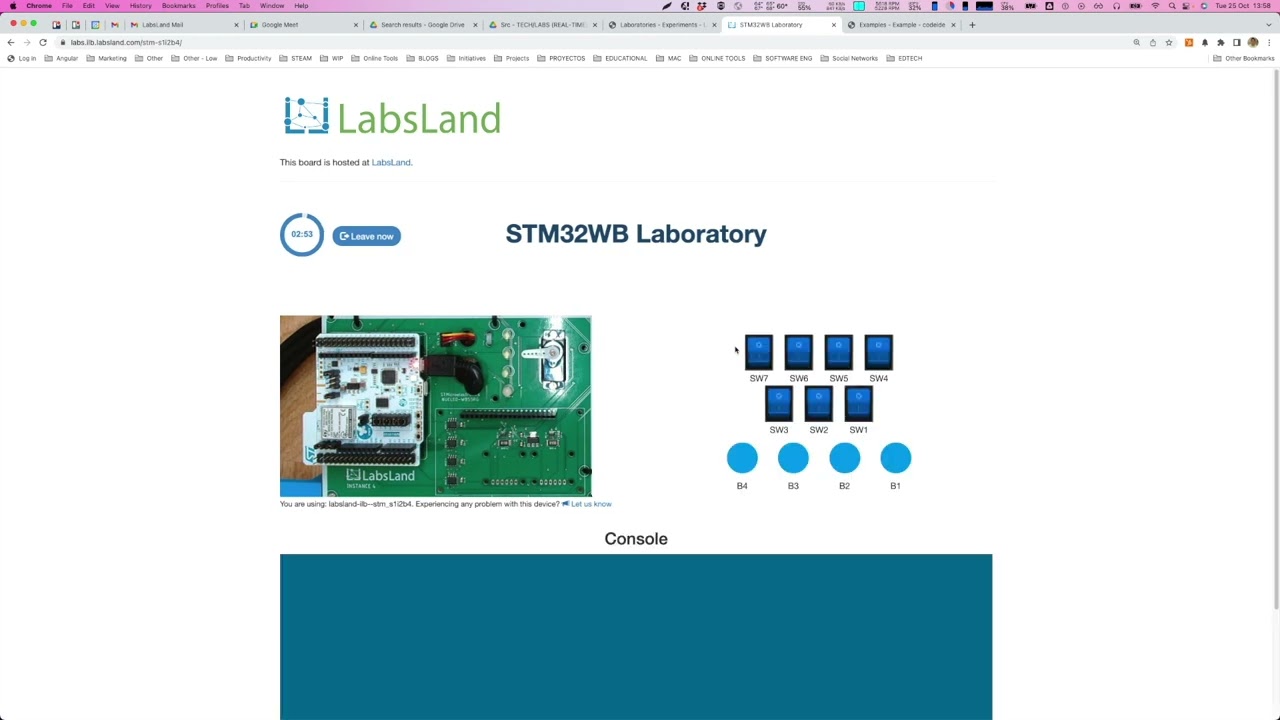
The STM32 lab allows users to program and control an ST WB55RG Nucleo board remotely. In this version of the laboratory, it is programmed using a fully web-based C/C++ online IDE. It includes various input and output peripherals, such as switches, buttons, potentiometers, and sensors, as well as an LCD screen and a servo motor. The laboratory can be used to study low-energy consumption modes. It is suitable for use in courses on embedded systems, microcontroller programming, the Internet of Things (IoT), etc.
The STM32 remote laboratory by LabsLand allows users to program and control an ST Nucleo WB55RG board and various input and output peripherals, such as LEDs, an RGB LED, switches, an OLED display, and a servo motor. The laboratory also supports a range of low-power modes, including Sleep, Low-power run, Low-power sleep, Stop 0, Stop 1, Stop 2, Standby, and Shutdown. These modes can be used to study the impact of energy consumption on the performance and functionality of the STM32 board.
This laboratory is used through an online Integrated Development Environment (IDE) for programming the STM32 board using C/C++. This IDE, developed by LabsLand, is fully web-based and easy to use, making it suitable and effective for educational purposes. With the online IDE, students can write, compile, and upload code to the STM32 board from any computer with an internet connection. The online IDE also includes a range of features and tools.
In traditional workflows, students using the STM32 remote laboratory by LabsLand might begin by using STM32CubeMX to generate a basic project that is compatible with the hardware and their project. To facilitate this process, LabsLand has pre-generated such a project and made it available to users as a starting point. This project is designed to be directly compatible with the hardware and serves as a good general starting point for educational purposes.
The STM32 remote laboratory relies internally on this template project, which can be downloaded by users to examine how it is configured. Users who wish to modify the template or generate their own project using STM32CubeMX can do so. In this case, they may prefer to use the alternative version of the laboratory that does not include an online IDE. That alternative version allows users to program the STM32 board using standard vendor or industry toolchains and upload a binary compiled file to the laboratory.
The STM32 remote laboratory by LabsLand is a versatile platform that can be applied to a wide range of courses, including:
These courses may involve programming the STM32 board, interfacing with various sensors and peripherals, and studying the principles of microcontroller-based systems and IoT. The STM32 remote lab provides the necessary hardware and software tools for hands-on learning and experimentation in these areas.
In this version of the laboratory users program the boards using LabsLand's online C/C++ IDE, an easy-to-use IDE with a shallow learning cuve designed for educational use.
An alternative version of the lab is available ("STM32 Nucleo - No IDE") that is designed to be used with any toolchain, including industry-standard toolchains, offline IDEs or fully-fledged online IDEs such as Mbed's. In this alternative version, users upload directly compiled binary files to program the board.
The development of this laboratory is conducted as part of the REMOCLEC project. The REMOCLEC consortium, led by LabsLand, is also formed by the University of Deusto and Plegma Labs. REMOCLEC is funded by the Smart4All European project, which is funded by the European Union’s Horizon 2020 research and innovation programme.
What students do
Video
Available experiments
Program a STM32 Nucleo board with C or C++
Teaching resources
This compressed file contains the default generated template or project used internally in the online editor.
Normally, when developing software for an STM32 device in the traditional way (with a "live" board), the project is started by configuring the device using the STM32CubeMX program. This free program, from STMicroelectronics, allows the initial configuration of the project and generates its initial code, as well as the files needed to open the project in different development environments.
In the online editor provided by this version of the LabsLand lab for STM32 the aim is to simplify the process as much as possible. It should also be taken into account that much of the hardware is already connected and fixed. For this reason, we have chosen to propose as a basis a template (a concrete generated startup project) that incorporates, correctly configured, the various peripherals of the laboratory.
Internally, in a transparent way for the user, when using the online IDE, this specific configuration is being used. The user will not need to generate it with STM32CubeMX, it is already generated. However, so that it can be used as a reference or as a starting point for alternative projects, outside the online IDE, a zipped file with this same template (the generated project) is provided in this material.
By downloading the corresponding compressed .ZIP file with this material, you will have access to the entire project generated by us by STM32CubeMX, prepared for the specific hardware of the laboratory; and used internally by the IDE. In addition, the archive will also contain a file with IOC ending, which can be opened with STM32CubeMX itself. In this way, a user who wishes to do so will be able to edit this configuration, and if desired, use it in different ways.
Note that there is an alternative version of the lab, called "No-IDE", which allows uploading a compiled binary. This version allows the use of modified templates.
Notes regarding the default template that may be used with the lab.
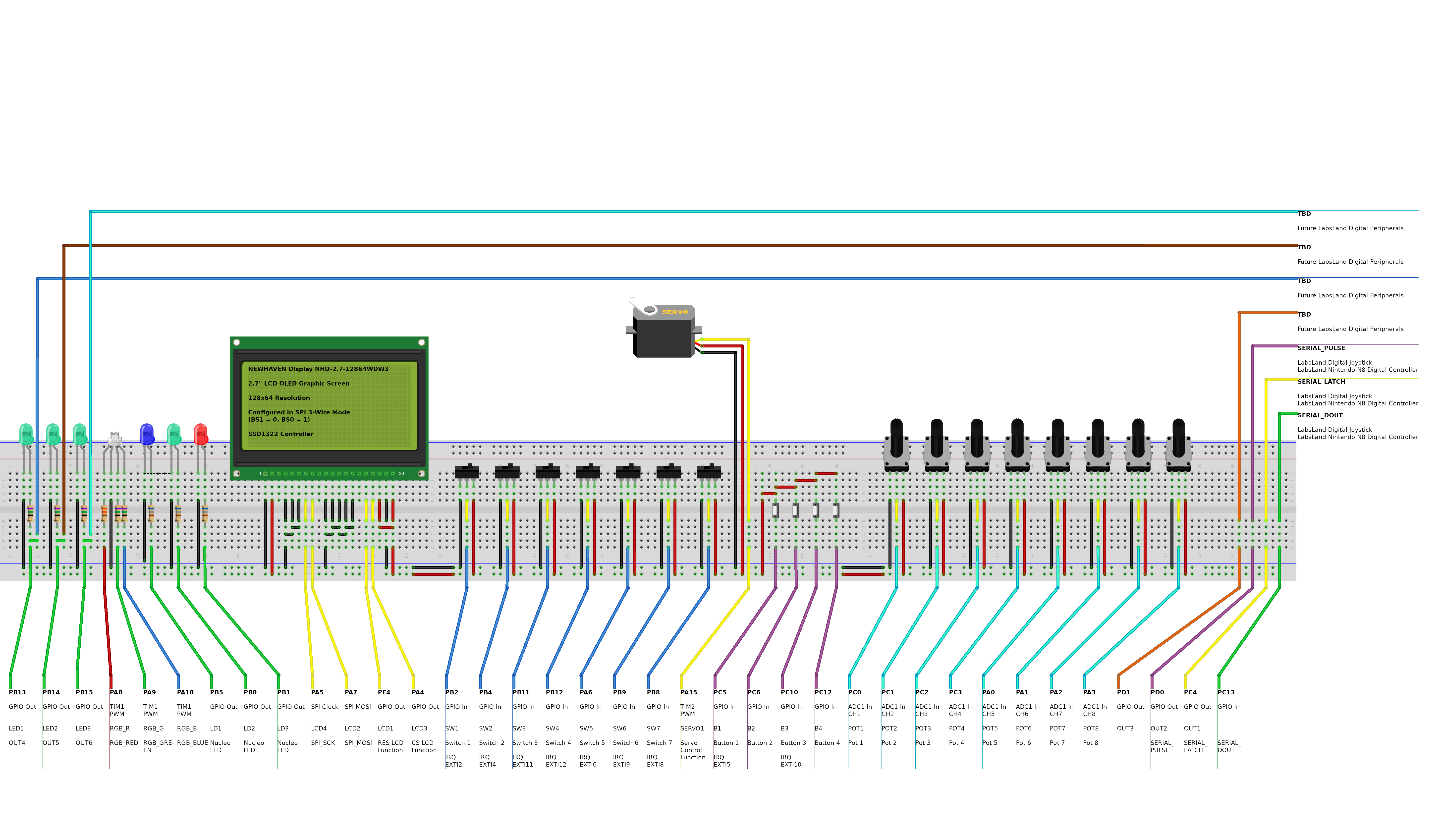
Open resourceFritzing Diagram for the STM32 lab
Open resourceActivity to conduct on the 3D smart parking model controlled with the real STM32 device
Design and implement a smart parking system logic using the STM Nucleo-WB55RG board in a remote lab setting. This interactive activity, hosted on LabsLand’s STM Nucleo-WB55RG remote laboratory, provides an immersive experience through a 3D virtual model of a parking system, which is controlled and interacts bidirectionally with the real STM device. You will develop your logic using C programming in an easy-to-use online IDE, without the need for physical hardware.
Solution for the Smart Parking design activity for STM32 and Online IDE
This is only the solution, available for instructors. You may download the activity itself in the non-solution link. This solution is designed for the C language online IDE using the standard template.