Back to labs

LabsLand FPGA Community

Altera DE1-SoC

Learn Hardware design with FPGAs using DE1-SoC

  • Codeide
  • Real-time labs
  • University & College
Altera DE1-SoC remote laboratory hosted by LabsLand FPGA Community

Laboratory information

Learn Hardware design with FPGAs using Terasic DE1-SoC!

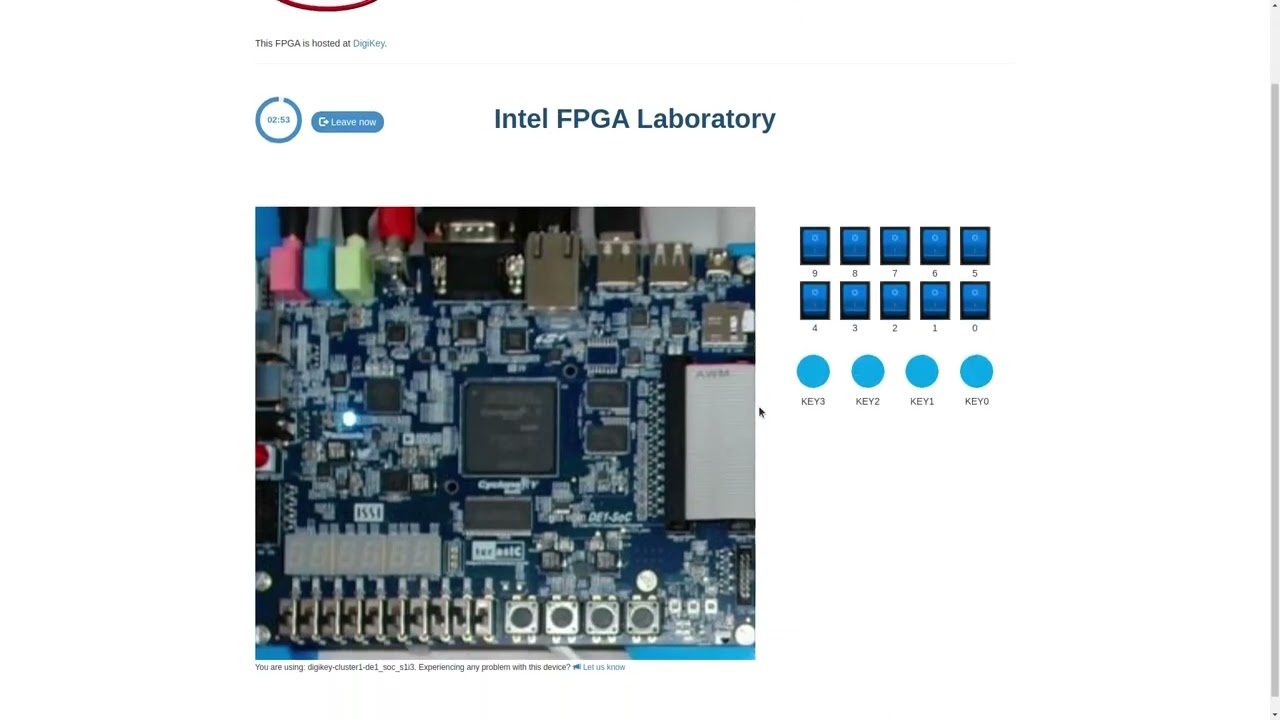
In this laboratory, you can learn how to program using two Hardware Design Languages: VHDL or Verilog, and test your code in a real Terasic DE1-SoC FPGA. The FPGA has a set of components already place, such as 10 red LEDs, 6 7-segment displays or multiple clocks. In addition, you will have access to 10 virtual switches and 4 virtual buttons that you can use in your design and that you will see when interacting with the real hardware. This way, you will be able to turn on and off the switches or press the buttons and see how your design behaves. The boards are located in different universities, as you will see when using each board.

In this laboratory, you do not need any software or hardware installed in your computer, tablet or phone.

What students do

Operate real equipment and reason from the measurements.

Recommended level
University & College
Typical access model
Codeide, Real-time labs
Works on
Modern web browsers on school, university, and home computers.
Teaching use
Suitable for assignments, demonstrations, LMS-linked activities, and remote practical work.

Video

Available experiments

Use the real laboratory from the browser.

DE1-SoC IDE Verilog

Program Altera FPGA DE1-SoC in Verilog

DE1-SoC IDE VHDL

Program Altera DE1-SoC DE1 in VHDL

DE1 IDE SystemVerilog

Program Altera FPGA DE1-SoC in SystemVerilog

Teaching resources

Public laboratory contents

Adapting external codes

How to adapt external VHDL or Verilog codes or external practices to the LabsLand FPGA laboratory

Open resource

Introduction to LabsLand FPGA. Simple combinational ALU.

Introduction to the LabsLand FPGA laboratory. Activity that involves the design of a combinational ALU that makes simple arithmetical operations.

Read more

Through this activity the following goals will be met:

  • Learn how to use the LabsLand FPGA lab.
  • Learn how to design entities that are reusable through components and port mapping.
  • Learn how to use elementary input-output peripherals (switches, buttons, 7-segment displays).
  • Learn basic combinational system concepts.
  • Learn how to design a simple ALU, that makes simple airthmetical operations.
  • Learn how to use "resize", type conversions and other VHDL characteristics.
Open resource

Breadboard GPIO guide

Use the breadboard to map GPIO to switches and LED's

Open resource

RHL Beadle

80+ pages of contents on how to use the FPGA laboratory, Boole Designer, Digital Trainer

Open resource

Introduction to LabsLand FPGA. Simple combinational ALU. (SOLVED).

Introduction to the LabsLand FPGA laboratory. Activity that involves the design of a combinational ALU that makes simple arithmetical operations.

Read more

(This is the solved version of this practice. The not-solved version is a different version of this practice).

Through this activity the following goals will be met:

  • Learn how to use the LabsLand FPGA lab.
  • Learn how to design entities that are reusable through components and port mapping.
  • Learn how to use elementary input-output peripherals (switches, buttons, 7-segment displays).
  • Learn basic combinational system concepts.
  • Learn how to design a simple ALU, that makes simple airthmetical operations.
  • Learn how to use "resize", type conversions and other VHDL characteristics.